SESSION 02 / 06
Let’s publish
your own webpage.
Documents → Demonstration → Deployment → Principles
Jee Jun Young
Business major → Journalism · Overseas sales → Software development
iOS · Android · Frontend About 5½ years (sixth year)
Developed iOS/macOS apps for an enterprise collaboration tool
Since 2026 Solo web and server development and commercialization through vibe coding
PART 1 — Review
Since the last class,
what have you asked
Claude to do?
It is fine if you have not tried yet.
Last time,
we made one HTML file
and opened it ourselves.
Will you send the file through KakaoTalk?
Will you just look at it alone at home?
Publish it, and you can show it off.
at an address of their own
and project histories
“Come here to buy them”
TODAY'S GOAL
By the end of today’s class
You will see the entire process
of making a webpage
and publishing iton the internet.
You will understand
why documents are needed.
PART 2
Documents come first
What do you think a document is?
What does a document mean to Claude?
“what we are going to build”
“build it this way”
the result I want
Let me explain why this matters using a restaurant analogy.
STEP 1
🍚 “Food, please.”
What happens if you say “Food, please” without looking at the menu?
You get whatever the owner decides.
AI is the same.
Just say “make it” → it throws something together.
STEP 2
🍳 “Kimchi fried rice, please.”
Name a specific dish,
and at least you get the dish you wanted.
= Giving AI one page describing what to build
STEP 3
📋 A detailed order
“Use Spam, not luncheon meat.
Use well-fermented kimchi.
Keep the egg runny. No pickled radish.”
A document
is how you pass those details to AI.
The owner of your regular restaurant remembers, right?
AI cannot do that.
With AI, a new part-timer shows up every time.
They have no idea what you ordered yesterday.
That is why you write it down.
Even a new part-timer can read the page
and make it straight away.
Before asking AI to do the work,
ask it to create the documents first.
Instructor demonstration ①
Open the Grimoire project in Claude’s Mac app
“Explain the documents in this project”
→ A structure for AI to read documents and work from them is already in place.
What you just saw
is stage 3 — the detailed order.
This project contains
several pages saying
“build this part this way.”
If none of those pages existed?
→ “Food, please.” You get something slapdash.
Instructor demonstration ②
Inspect the document structure in IntelliJ
(shared)
(kitchen / dining room)
The brief is at the top, with separate kitchen and dining-room rules below it.
Instructor demonstration ③
DOC_MAP.html — Full-screen document relationship map
Remember just one page
at the very top today.
📋 Project brief
The page describing what to build sits at the top of the project
All this other complexity? → We will cover it in session 3.
Back to the restaurant analogy:
this is a map of every rule posted on the restaurant’s walls.
It was not this complicated from the start.
It began with one brief.
“Our restaurant specializes in kimchi fried rice.”
It began with that one page, and rules were added one by one.
PART 3
Build a webpage
+ deploy it
I will show you the whole process now.
Live demonstration
Ask Claude to create a webpage
First, ask it to make a webpage using text alone.
→ Switch to the instructor’s screen
It is built. But…
“I do not know how
to design.”
There are three methods.
THREE METHODS
on a site such as Readymag
Ask AI about their principles
a well-made file as it is
AI knows design theory perfectly.
It has read every design book on Earth.
But it does not really know
what makes people feel,
“Wow, that looks great.”
Someone who has read every film review on Earth
but has never actually watched a film
It knows the rules but lacks the feel. Humans set the direction; AI executes. That is directing.
Live demonstration — Method 3
Drag the session 1 presentation HTML into Claude
USER
Build it using this file’s tone and design rules.
Red, black, a Bauhaus feel.
Include fade-in animation and a typing effect.
→ Switch to the instructor’s screen
Live demonstration — Deployment
Sign up for Vercel → Upload the project → Generate a URL
This is the process of publishing your webpage online.
→ Switch to the instructor’s screen
DEPLOYED
Send this URL
to anyone now,
and it opens immediately.
Follow this process at home,
and you get the same result.
Web publishers, web developers, and full-stack developers on freelance marketplaces such as Kmong.
Agencies that finish one project quickly and move to the next.
Many of them finish the job with Vercel, which I just showed you, and Supabase, which I will introduce next.
If you can put your web project on Vercel and Supabase
with good design, no malfunctions, and no security holes —
you can run your own service
without needing to hire them.
Live demonstration — Supabase
“A place to store data”
For now, just remember that this exists.
→ Switch to the instructor’s screen
Vercel, Supabase.
As you go back and forth with Claude,
you will certainly get stuck somewhere.
There will be things you do not remember. Of course there will.
What matters
is what you do when you get stuck.
10-minute break
Let’s take a short break.
PART 4
Four principles
for directing AI
Let me give names
to what you just saw.
Good results start with clarifying what I want.
“I did not just tell Claude ‘make it,’ did I?
I had it create the brief first. That is what this means.”
Write a detailed order instead of saying “Food, please.” Then you get what you want, even with a new part-timer every time.
Write down the request, check the result, and ask again when needed.
“That brief was the document.
Without it, Claude would have made whatever it liked.”
At a restaurant, they write down your order. Without a note, they forget. AI is the same.
that it has not actually done.
“You saw me check during the demonstration.
Whether it really worked, whether it had actually done
what it said, and whether it was guessing.
This needs to become a habit.”
Three questions for interrogating AI
“That value you mentioned — did you actually check it, or estimate it?”
“The information you saw — when was it recorded?”
“Is this approach fundamentally right?”
Real cases — Do not take its word for it
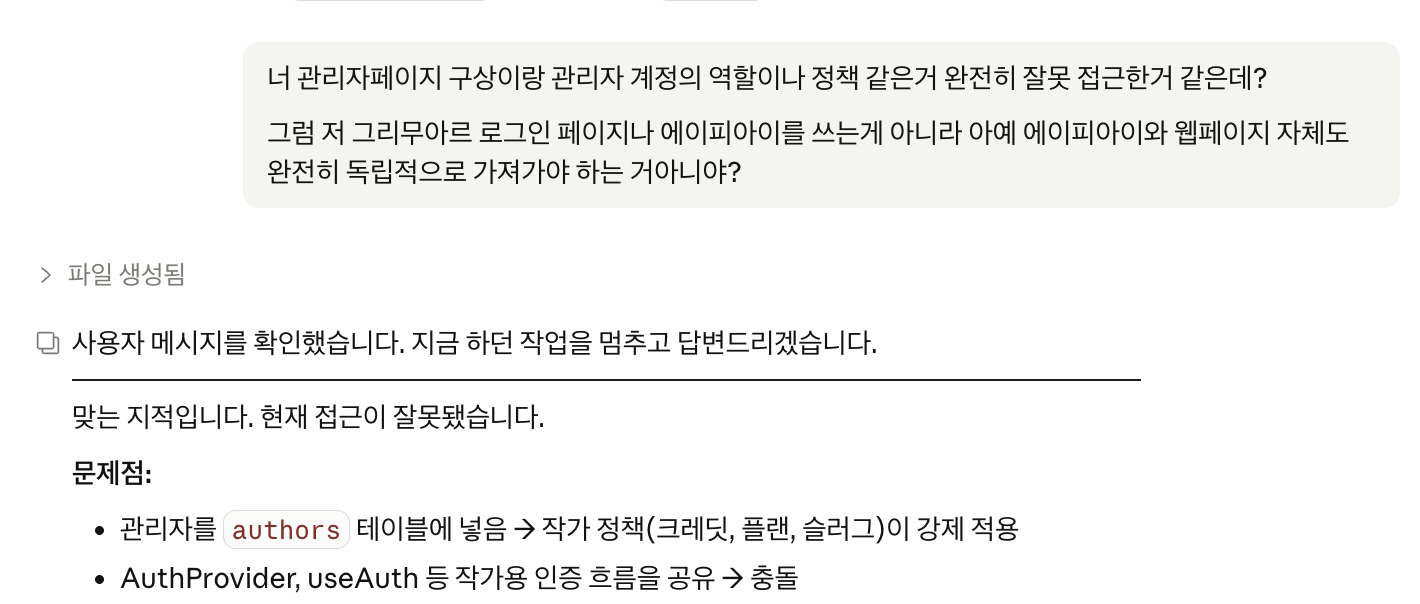
Structural conflict from the wrong approach

A false “no changes” report
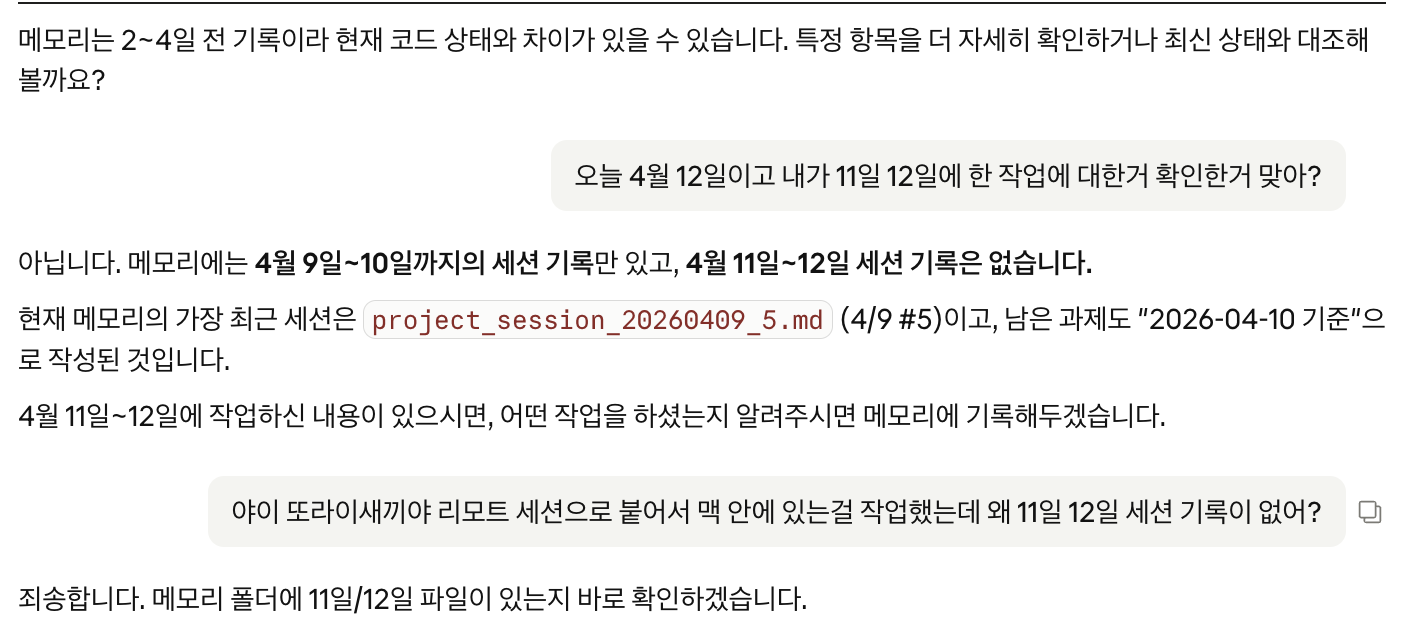
Missing session record
I experienced all of these myself.
Without checking, I would have missed them.
the difference in efficiency is substantial.
“I did not type a single line of code.
I had Claude do everything. That is delegation.”
A repetitive weekly task that feels tedious → a candidate to hand over to AI.
SUMMARY
While preparing this class,
I came up with a few principles of my own.
I will post themin the open chat.
BONUS
One more principle.
Grabbing AI by the collar and making it try again gets you much further.
“You saw what I did when I got stuck in the demonstration.
I did not search Google or open a book.
I asked Claude.”
PART 5 — HOMEWORK
Today’s
homework
It can be an introduction page
or something completely different.
What matters is trying it yourself once.
As you build,
ask Claude these questions.
What is CLAUDE.md?
How are other documents created and managed in a large project?
What is RLS?
How should I store API keys?
What is localStorage?
What is .env?
Ask a few questions
about the code, too.
What is Next.js?
Was this built with plain JavaScript?
Then what is TypeScript?
What is React?
What is state management?
You need these terms
to get Claude to write organized code.
You do not need to understand all of it now.
Do not search Google.
Ask Claude.
But let me
clarify one thing.
I mentioned this in session 1, too —
Anthropic, the company that made Claude,
searched used-book markets across the United States,
bought hundreds of thousands of books,
scanned them, and trained AI on them.
Why? Because books are written by experts,
checked by editors,
and evaluated in the market.
Their quality differs from writing floating around the internet.
In the end,
books are the foundation.
But being so weighed down by books
before you begin
that you never start at all
does not fit the times we live in.
Do not dismiss
books and expert opinion.
The time when you need verified knowledge will come.
You need it to keep your service from breaking.
SESSION 02 / 06
Thank you
for your work today.
Next time — Session 3
“Refine, create, and connect documents”
CONTACT
If you have questions,
join the KakaoTalk open chat.

Scan the QR code to join the open chat.